Chapter 01
Java Introduction
7 topics · 1 sections · beginner-friendly study notes · Updated
Java is a high-level, class-based, object-oriented programming language designed to run on any device that has a Java Virtual Machine.
This chapter explains what Java is, its features, history, the difference between JDK, JRE and JVM, the inside of the JVM, your first Hello World program and how to install Java.
Java powers banking systems, Android apps, enterprise backends and big-data tools.
Interviews and university exams always begin with these basics, so clear answers here save easy marks.
Spring Boot backends, Android development, banking and payment software, Hadoop and Kafka ecosystem tools, desktop tools, and large enterprise systems.
What is Java
Java is a high-level, general-purpose, class-based and object-oriented programming language. Java source code (.java) is compiled by javac into platform-independent bytecode (.class), which the Java Virtual Machine (JVM) executes on any operating system.
In short: Java is a language you use to write programs once and run them on Windows, Linux or macOS without changing the code.
Think about it
Software companies needed one language whose programs could run on many kinds of machines without rewriting. Java solved this with bytecode and the JVM. The same bank application .jar file runs on a Windows laptop during development and on a Linux server in production.
Java follows the idea "Write Once, Run Anywhere" (WORA).
You do not compile to machine code for a particular CPU.
You compile to bytecode, and each platform has its own JVM that understands that bytecode.
Java is statically typed: every variable has a type that the compiler checks before the program runs.
Java is also strongly object-oriented: all code lives inside classes (except primitive values).
The JVM manages memory for you with a garbage collector, so you never call free().
Java is used for web servers (Spring, Jakarta EE), Android apps, desktop apps (JavaFX, Swing), big-data tools (Hadoop, Kafka, Spark), embedded devices and cloud microservices.
Key points
- Source code: Text you write in a .java file.
- Bytecode: Platform-independent instructions stored in a .class file.
- JVM: Virtual machine that loads and runs bytecode.
- WORA: Write Once, Run Anywhere.
- Statically typed: Types are checked at compile time.
- Java source files end with .java and compiled files end with .class.
- Java is case-sensitive. Student and student are different names.
- A public class must be saved in a file with the same name as the class.
- Java is both compiled (to bytecode) and interpreted (by the JVM).
Example
Codefirst look at Java:
// File: Welcome.java
public class Welcome {
public static void main(String[] args) {
int price = 250;
double taxRate = 0.18;
double total = price + price * taxRate;
System.out.println("Total payable: " + total); // 295.0
// Java is statically typed: the type is fixed at declaration
int x = 10;
// x = "ten"; // compile-time error: incompatible types
System.out.println("x = " + x);
}
}
// Compile : javac Welcome.java -> creates Welcome.class
// Run : java WelcomeFeatures of Java
Features of Java are the built-in qualities that make it popular: simple, object-oriented, platform independent, secure, robust, architecture neutral, portable, multithreaded, high performance, distributed and dynamic.
In short: Features are the strong points of Java. They make programs safe, portable and easy to maintain.
Think about it
These features explain why large teams choose Java for long-lived, large applications. A multithreaded web server handles thousands of requests while the garbage collector cleans memory in the background.
1) Simple: no pointers, no operator overloading, no multiple inheritance of classes.
2) Object-oriented: everything is organised in classes and objects.
3) Platform independent: bytecode runs on any JVM.
4) Secure: no explicit pointers, bytecode verifier, class loader, security manager (legacy) and sandboxing.
5) Robust: strong type checking, exception handling and automatic garbage collection.
6) Architecture neutral: the size of int is always 4 bytes on every machine.
7) Portable: because of bytecode and fixed data sizes.
8) Multithreaded: built-in Thread support, synchronized and the java.
util.
concurrent package.
9) High performance: the JIT compiler turns hot bytecode into native machine code.
10) Distributed: networking APIs, RMI and HTTP clients.
11) Dynamic: classes are loaded at run time and reflection can inspect them.
Key points
- Garbage collection: Automatic removal of objects that are no longer reachable.
- JIT: Just-In-Time compiler that converts hot bytecode to machine code.
- Reflection: Ability to inspect classes and methods at run time.
- Thread: A path of execution inside a program.
- Java has no explicit pointers, which removes a big class of memory bugs.
- Java does not support multiple inheritance of classes, but a class can implement many interfaces.
- int is always 32 bits in Java, unlike C where it depends on the machine.
Example
Codefeatures in action:
public class FeaturesDemo {
public static void main(String[] args) throws InterruptedException {
// Platform independent: ask the JVM about the platform
System.out.println("OS : " + System.getProperty("os.name"));
System.out.println("Java : " + System.getProperty("java.version"));
// Architecture neutral: sizes are fixed
System.out.println("int bytes : " + Integer.BYTES); // 4 everywhere
System.out.println("long bytes : " + Long.BYTES); // 8 everywhere
// Multithreaded
Thread t = new Thread(() -> System.out.println("Hello from " + Thread.currentThread().getName()));
t.setName("worker-1");
t.start();
t.join();
// Robust: exception handling instead of a crash
try {
int[] a = new int[2];
a[5] = 1;
} catch (ArrayIndexOutOfBoundsException e) {
System.out.println("Caught: " + e.getMessage());
}
}
}History of Java
Java was created by James Gosling, Mike Sheridan and Patrick Naughton (the Green Team) at Sun Microsystems. The project started in 1991 as "Oak", was renamed Java in 1995 and Java 1.0 was released in 1996. Oracle acquired Sun Microsystems in 2010.
In short: Java began as a language for small electronic devices and became the language of the internet and enterprise software.
Think about it
Knowing the history helps you understand why Java has features such as bytecode, applets and garbage collection, and which version to use in a project. Most companies run production systems on an LTS version such as Java 17 or Java 21.
Oak was first designed for set-top boxes and consumer electronics.
When the web became popular, the team saw that bytecode and the JVM were ideal for downloading small programs (applets) to browsers.
The name Java comes from Java coffee.
Important milestones: JDK 1.0 (1996); J2SE 1.2 (1998) with Collections and Swing; J2SE 5.0 (2004) with generics, annotations, enhanced for and enums; Java 8 (2014) with lambdas, streams and the new date-time API; Java 9 (2017) with modules; Java 11 (2018, LTS) with the HTTP client and var in lambdas; Java 17 (2021, LTS) with sealed classes and records; Java 21 (2023, LTS) with virtual threads and pattern matching for switch.
Since Java 9 a new feature release arrives every six months and a Long-Term Support (LTS) version arrives every few years.
Key points
- Oak: The original name of the language.
- LTS: Long-Term Support release that gets updates for many years.
- Applet: Small Java program once embedded in web pages (now removed).
- OpenJDK: The open-source reference implementation of Java SE.
- Creator = James Gosling, known as the father of Java.
- Java 8 is the version that introduced lambda expressions and the Stream API.
- Applets and the Security Manager are deprecated or removed in modern Java.
Example
CodeJava timeline in code:
import java.util.LinkedHashMap;
import java.util.Map;
public class JavaTimeline {
public static void main(String[] args) {
Map<Integer, String> timeline = new LinkedHashMap<>();
timeline.put(1991, "Green Project starts, language named Oak");
timeline.put(1995, "Renamed to Java");
timeline.put(1996, "JDK 1.0 released");
timeline.put(2004, "Java 5: generics, enums, annotations");
timeline.put(2010, "Oracle acquires Sun Microsystems");
timeline.put(2014, "Java 8: lambda, streams");
timeline.put(2018, "Java 11 LTS");
timeline.put(2021, "Java 17 LTS: sealed classes, records");
timeline.put(2023, "Java 21 LTS: virtual threads");
timeline.forEach((year, event) -> System.out.println(year + " -> " + event));
// The running JVM tells its own version
System.out.println("Running on feature version: " + Runtime.version().feature());
}
}JDK vs JRE vs JVM
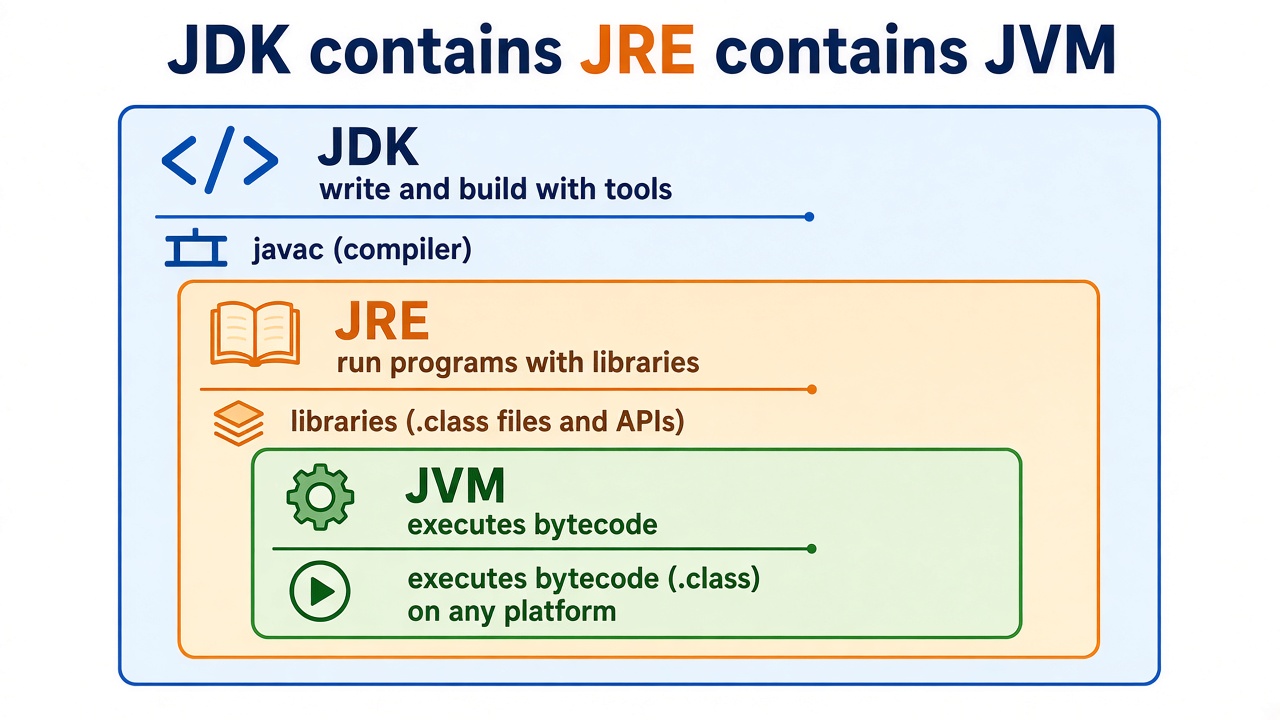
JVM (Java Virtual Machine) loads and executes bytecode. JRE (Java Runtime Environment) is the JVM plus the core class libraries needed to run Java programs. JDK (Java Development Kit) is the JRE plus development tools such as javac, javap, jar, jdb and javadoc.
In short: JDK is to write and build, JRE is to run, JVM is the engine inside both.
Think about it
Installing only a JRE gives the common error "javac is not recognized". Knowing the difference avoids setup mistakes. A Docker build stage uses a full JDK to compile code; the final image uses a slim runtime to run it.
Think of three boxes: the JVM is the smallest box, the JRE contains the JVM, and the JDK contains the JRE.
A developer needs the JDK.
A user who only runs a program needs a runtime.
The JVM is platform dependent: there is a different JVM build for Windows, Linux and macOS.
Bytecode is platform independent.
The JVM itself is a specification; HotSpot (default in OpenJDK), OpenJ9 and GraalVM are implementations.
Since Java 9 a separate public JRE download is no longer provided by Oracle; the tool jlink creates a custom runtime image with only the modules you need.
Key points
- javac: Compiler that converts .java to .class.
- java: Launcher that starts the JVM and runs a class.
- javap: Disassembler that shows bytecode of a class.
- jar: Tool that packages classes into a .jar archive.
- jlink: Tool that builds a trimmed custom runtime.
- JDK contains JRE, and JRE contains JVM.
- javac is in the JDK, not in a plain runtime.
- JVM is platform dependent but bytecode is platform independent.
Read more
Example
Codeask the JVM about itself:
public class RuntimeInfo {
public static void main(String[] args) {
System.out.println("Java version : " + System.getProperty("java.version"));
System.out.println("Java vendor : " + System.getProperty("java.vendor"));
System.out.println("JVM name : " + System.getProperty("java.vm.name"));
System.out.println("Java home : " + System.getProperty("java.home"));
System.out.println("OS : " + System.getProperty("os.name"));
System.out.println("CPU cores : " + Runtime.getRuntime().availableProcessors());
}
}
// Useful commands:
// javac RuntimeInfo.java (JDK tool)
// java RuntimeInfo (launcher: starts a JVM)
// javap -c RuntimeInfo (shows bytecode)JVM Architecture
The JVM has three main parts: the Class Loader Subsystem (loading, linking, initialisation), the Runtime Data Areas (method area/metaspace, heap, Java stacks, PC registers, native method stacks) and the Execution Engine (interpreter, JIT compiler and garbage collector).
In short: Objects live on the heap. Every method call gets a frame on a stack. Class information lives in metaspace.
Think about it
StackOverflowError, OutOfMemoryError, ClassNotFoundException and GC tuning questions all depend on understanding this map. Production servers are tuned with flags such as -Xmx (maximum heap), -Xss (thread stack size) and -XX:MaxMetaspaceSize.
Class loading is lazy and follows parent delegation: Bootstrap loader (core classes) then Platform loader then Application loader.
Linking has three steps: verification (bytecode is safe), preparation (static fields get default values) and resolution (symbolic references become direct references).
Then initialisation runs static blocks.
Runtime areas: the Heap is shared by all threads and stores objects and arrays; it is cleaned by the garbage collector.
Metaspace (native memory since Java 8, replacing PermGen) stores class metadata and the runtime constant pool.
Each thread has its own Java stack made of frames (local variables, operand stack, frame data) and its own program counter register.
Native method stacks serve native (C/C++) code.
The Execution Engine starts with the interpreter; the profiler finds hot methods and the JIT compilers (C1 and C2) compile them to machine code.
Key points
- Heap: Shared memory area for objects.
- Stack: Per-thread memory area for method frames and local variables.
- Metaspace: Native memory area for class metadata.
- PC register: Holds the address of the current instruction of a thread.
- Stack frame: One method call record on the stack.
- Heap is shared by all threads; stack is private to each thread.
- Local variables live on the stack; objects live on the heap.
- Too deep recursion causes StackOverflowError; too many live objects cause OutOfMemoryError.
Example
Codestack, heap and StackOverflowError:
public class JvmMemoryDemo {
static int depth = 0;
static void recurse() { // every call adds a frame on the stack
depth++;
recurse();
}
public static void main(String[] args) {
Runtime rt = Runtime.getRuntime();
System.out.println("Max heap MB : " + rt.maxMemory() / (1024 * 1024));
System.out.println("Total heap MB : " + rt.totalMemory() / (1024 * 1024));
System.out.println("Free heap MB : " + rt.freeMemory() / (1024 * 1024));
String name = new String("Heap object"); // object on heap, reference on stack
int local = 42; // primitive local on stack
System.out.println(name + " " + local);
try {
recurse();
} catch (StackOverflowError e) {
System.out.println("StackOverflowError after depth " + depth);
}
}
}Hello World in Java
Hello World is the first Java program. It defines a class with the entry point public static void main(String[] args) and prints a message using System.out.println().
In short: Write a class, add a main method, print text, compile with javac and run with java.
Think about it
Every Java program starts from main. Understanding each keyword answers a very common viva question. Spring Boot applications also start from a main method that calls SpringApplication.run().
public: the JVM must be able to call main from outside the class.
static: main runs without creating an object.
void: main returns nothing to the JVM.
main: the fixed name the JVM looks for.
String[] args: command-line arguments.
System is a final class in java.
lang, out is a static PrintStream field and println() prints a line.
Steps
1) save as Hello.
java, 2) javac Hello.
java creates Hello.
class, 3) java Hello runs it.
Do not write .
class when running.
From Java 11 you can also run a single file directly with java Hello.
java.
Preview features in newer versions even allow a shorter main method, but the classic form remains the standard for exams.
Key points
- main method: Entry point called by the JVM.
- args: Array of command-line arguments passed to main.
System.out: Standard output stream (PrintStream).println: Prints text and moves to a new line.- The class name and file name must match when the class is public.
- main is not a keyword; it is a method name the JVM looks for.
print()does not add a new line;println() does;printf() formats text.- Every statement ends with a semicolon and blocks use curly braces.
Example
CodeHello World with arguments:
// File: Hello.java
public class Hello {
public static void main(String[] args) {
System.out.println("Hello, World!");
System.out.print("No new line here. ");
System.out.println("Now a new line.");
System.out.printf("Pi to 2 places: %.2f%n", Math.PI);
// command-line arguments: java Hello Asha Ravi
System.out.println("Number of arguments: " + args.length);
for (String a : args) {
System.out.println("Hello, " + a);
}
}
}
// javac Hello.java
// java Hello Asha RaviHow to Install Java
To install Java you download a JDK (Oracle JDK or an OpenJDK build such as Temurin), run the installer or unzip it, set the JAVA_HOME environment variable, add its bin folder to PATH and verify with java -version and javac -version.
In short: Download the JDK, install it, tell the system where it is, and test it from the terminal.
Think about it
A wrong setup is the most common reason beginners cannot run their first program. Build servers set JAVA_HOME so Maven and Gradle know which JDK to use.
Windows: download the .
msi installer, install, then open System Properties > Environment Variables.
Create JAVA_HOME = C:\Program Files\Java\jdk-21 and add %JAVA_HOME%\bin to Path.
Linux (Ubuntu): sudo apt update then sudo apt install openjdk-21-jdk.
macOS: brew install openjdk@21 or use the pkg installer.
Verify using java -version and javac -version in a new terminal.
Both commands must show the same major version.
If javac is not found, PATH is wrong or only a runtime is installed.
Many developers manage several JDKs with SDKMAN (Linux/macOS) or the IDE (IntelliJ IDEA, Eclipse, VS Code) can download one for you.
Key points
- JAVA_HOME: Environment variable that points to the JDK folder.
- PATH: List of folders searched for commands such as java and javac.
- Temurin: A popular free OpenJDK distribution.
- SDKMAN: Tool to install and switch Java versions on Linux and macOS.
- Open a NEW terminal after changing environment variables.
- java -version checks the runtime; javac -version checks the compiler.
- Use an LTS version (17 or 21) for learning and projects.
Example
Codecheck your setup:
// Verify your installation with this file: CheckSetup.java
public class CheckSetup {
public static void main(String[] args) {
String home = System.getenv("JAVA_HOME");
System.out.println("JAVA_HOME = " + (home == null ? "not set" : home));
System.out.println("java.version = " + System.getProperty("java.version"));
System.out.println("java.home = " + System.getProperty("java.home"));
System.out.println("Setup looks fine if a version is printed above.");
}
}
/* Terminal steps
Windows (PowerShell): java -version
javac -version
Ubuntu: sudo apt update
sudo apt install openjdk-21-jdk
Run a single file: java CheckSetup.java (Java 11+)
*/Solved examples
Write a Java program that prints your name and course on two separate lines.
Two-line output using System.out.println()
Formula Applied:—Approach note: Each println() ends with a new line; print() does not.
Why do we get the error "class Hello is public, should be declared in a file named Hello.java"?
Reason and fix
Formula Applied:—Approach note: Only one public top-level class is allowed per file.
A student installed Java but javac gives "not recognized". What went wrong and how do you fix it?
Diagnosis and steps
Formula Applied:—Approach note: Both java -version and javac -version should report the same major version.
List the steps from Hello.java source to running output on the JVM, naming javac and java roles.
Compile → bytecode → interpret
Formula Applied:—Approach note: javac compiles; java runs. Do not confuse the two commands.
Real-world applications
Using Java Introduction in real projects
Spring Boot backends, Android development, banking and payment software, Hadoop and Kafka ecosystem tools, desktop tools, and large enterprise systems.
Common mistakes
❌ Myth: Java is a purely interpreted language.
Why this is wrong: Java source is first compiled to bytecode by javac.
✅ Verified Truth: Java is compiled to bytecode and then run by the JVM, which interprets and JIT-compiles it.
⚠️ Exam Tip: Say "compiled to bytecode, executed by the JVM".
❌ Myth: JVM is platform independent.
Why this is wrong: Each operating system has its own JVM build.
✅ Verified Truth: Bytecode is platform independent; the JVM is platform dependent.
⚠️ Exam Tip: A classic one-mark question: answer "JVM is platform dependent".
❌ Myth: JRE contains the compiler javac.
Why this is wrong: The compiler is a development tool.
✅ Verified Truth: javac belongs to the JDK, not the JRE.
⚠️ Exam Tip: Remember JDK = JRE + tools.
❌ Myth: Java has pointers like C.
Why this is wrong: Java hides memory addresses and has no pointer arithmetic.
✅ Verified Truth: Java uses references to objects; there are no explicit pointers.
⚠️ Exam Tip: Say "references, not pointers".
Revision notes
Java is a high-level, class-based, object-oriented programming language designed to run on any device that has a Java Virtual Machine. This chapter explains what Java is, its features, history, the difference between JDK, JRE and JVM, the inside of the JVM, your first Hello World program and how to install Java.
High-Yield Quick Revision Points
- Java = high-level, object-oriented, class-based language created by James Gosling at Sun (1991 Oak, 1995 Java, 1996 JDK 1.0).
- Source (.java) -> javac -> bytecode (.class) -> JVM executes it (WORA).
- Features: simple, OOP, platform independent, secure, robust, multithreaded, portable, high performance, distributed, dynamic.
- JDK = JRE + development tools; JRE = JVM + libraries; JVM runs bytecode.
- JVM parts: class loader, runtime data areas (heap, metaspace, stacks, PC), execution engine (interpreter, JIT, GC).
- Heap is shared; stack is per thread; local variables on stack, objects on heap.
- Entry point: public static void main(String[] args).
- Install JDK, set JAVA_HOME, add bin to PATH, verify with java -version and javac -version.
Practice questions
Who is known as the father of Java?
What was the original name of Java?
Which component converts .java files into bytecode?
Which of the following is platform dependent?
Where are objects stored in the JVM?
Which exception occurs on infinite recursion?