Chapter 04
SQL Joins & Subqueries
6 topics · 2 sections · beginner-friendly study notes · Updated
A JOIN combines rows from two or more tables using a related column.
A subquery is a query placed inside another query.
Together they let us answer questions that need data from many tables.
Real data is split into many tables to avoid repetition.
Joins bring that data back together for reports.
Showing student names with department names, orders with customer names, employees with their managers.
INNER JOIN
INNER JOIN returns only the rows that have a match in both tables.
In short: Show only students who really have a department, and departments that really have students.
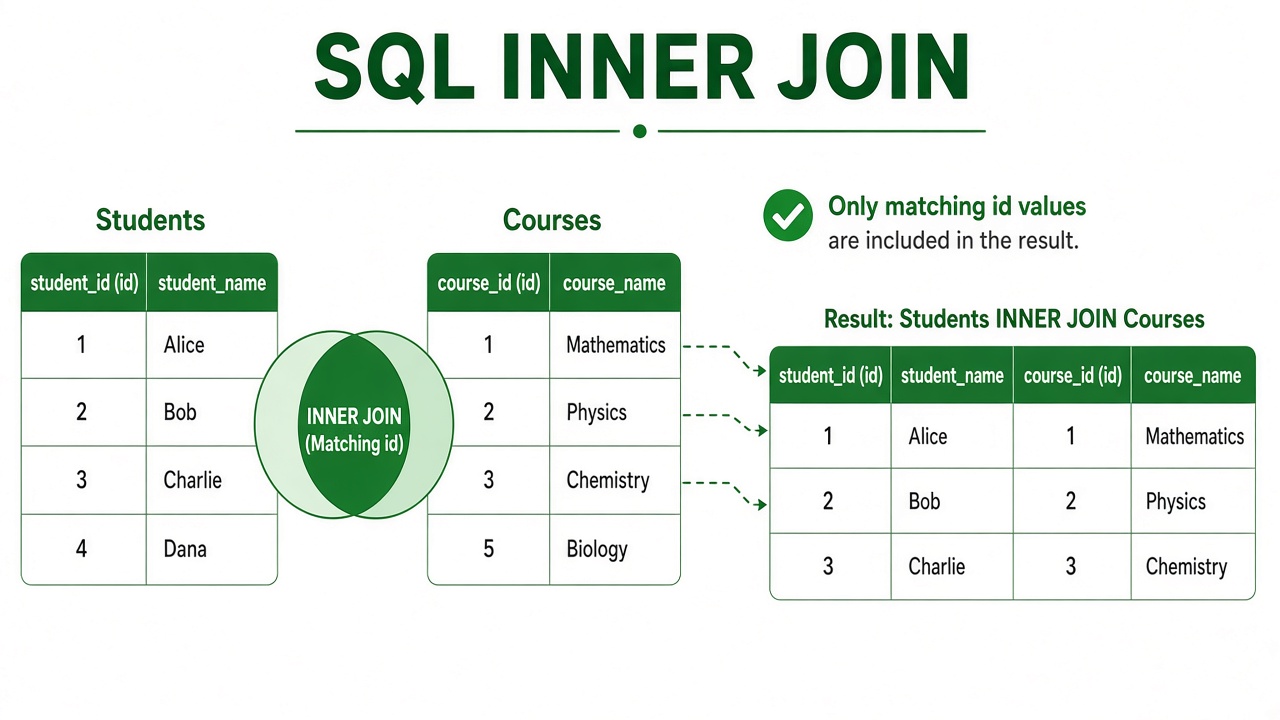
Think about it
Most real queries need data from more than one table, and INNER JOIN is the most common type. The student table has dept_id only. The department table has the department name. We join them to print "Asha - Computer Science".
Syntax
SELECT ...
FROM A INNER JOIN B ON A.key = B.key.
The ON part tells SQL how rows match.
Rows that find no match in the other table are left out.
INNER is optional; plain JOIN means INNER JOIN.
If the key names are the same we can use USING(key).
We can join more than two tables by adding more JOIN lines.
Always use table aliases for shorter and clearer code, and write table.
column when two tables have the same column name.
Key points
Example
CodeINNER JOIN: SELECT s.roll_no, s.name, d.dept_name FROM student s INNER JOIN department d ON s.dept_id = d.dept_id; -- Three tables SELECT s.name, c.course_name, e.grade FROM enrolment e JOIN student s ON e.roll_no = s.roll_no JOIN course c ON e.course_id = c.course_id;
LEFT, RIGHT & FULL JOIN
LEFT JOIN keeps all rows of the left table. RIGHT JOIN keeps all rows of the right table. FULL JOIN keeps all rows of both tables. Missing matches are filled with NULL.
In short: Outer joins also show the rows that have no partner. The empty side shows NULL.
Think about it
Inner join hides missing data. Outer joins help us find students without a department, customers without orders and similar gaps. A list of all departments, even the new one which has no student yet. The student column shows NULL for it.
LEFT JOIN: every row from the left table appears.
If there is no match on the right, right columns are NULL.
RIGHT JOIN is the mirror image.
FULL (OUTER) JOIN is the combination of both.
MySQL has no FULL JOIN, so we write LEFT JOIN UNION RIGHT JOIN.
A common trick is to find rows with no match: LEFT JOIN and then WHERE right_table.
key IS NULL.
For example, departments with no students.
The word OUTER is optional.
Key points
Read more
Example
CodeOuter joins: -- All departments, even with no students SELECT d.dept_name, s.name FROM department d LEFT JOIN student s ON d.dept_id = s.dept_id; -- Departments that have NO students SELECT d.dept_name FROM department d LEFT JOIN student s ON d.dept_id = s.dept_id WHERE s.roll_no IS NULL; -- All students, even with no department SELECT s.name, d.dept_name FROM student s RIGHT JOIN department d ON s.dept_id = d.dept_id; -- FULL JOIN (PostgreSQL, SQL Server, Oracle) SELECT s.name, d.dept_name FROM student s FULL JOIN department d ON s.dept_id = d.dept_id; -- FULL JOIN in MySQL SELECT s.name, d.dept_name FROM student s LEFT JOIN department d ON s.dept_id = d.dept_id UNION SELECT s.name, d.dept_name FROM student s RIGHT JOIN department d ON s.dept_id = d.dept_id;
CROSS JOIN & SELF JOIN
CROSS JOIN pairs every row of one table with every row of another. SELF JOIN joins a table with itself.
In short: CROSS JOIN makes all possible pairs. SELF JOIN compares rows of the same table.
Think about it
Combinations and hierarchy data (employee-manager, parent-child) need these joins. Cross join: matching every student with every subject for a timetable. Self join: printing each employee with the name of their manager from the same employee list.
CROSS JOIN has no ON condition.
If table A has 3 rows and table B has 4 rows, the result has 3 x 4 = 12 rows.
It is useful for making combinations, such as every size with every colour.
SELF JOIN is not a special keyword.
We just use the same table twice with different aliases.
A classic case is the employees table where each employee has a manager_id that points to another employee in the same table.
We join employees e with employees m on e.
manager_id = m.
emp_id.
Key points
Read more
Example
CodeCROSS and SELF JOIN: -- CROSS JOIN: every size with every colour SELECT s.size_name, c.colour_name FROM sizes s CROSS JOIN colours c; -- SELF JOIN: employee and manager SELECT e.name AS employee, m.name AS manager FROM employees e LEFT JOIN employees m ON e.manager_id = m.emp_id;
Nested Subqueries
A subquery (inner query) is a SELECT written inside another query. The inner query runs first and gives its result to the outer query.
In short: First find a small answer, then use that answer in the big question.
Think about it
Some questions need two steps: first the average, then the students above the average. Step 1: the teacher calculates the class average. Step 2: she lists students above that average.
A subquery is written in brackets.
It can be placed in WHERE, FROM or SELECT.
A scalar subquery returns one value, so we can use = or >.
A multi-row subquery returns a list, so we use IN, ANY or ALL.
A subquery in FROM is called a derived table and needs an alias.
Subqueries can be nested more than one level deep, but too many levels become hard to read; a JOIN is often clearer and faster.
Example
students scoring more than the class average.
Key points
Example
CodeNested subqueries: -- Students above the class average SELECT name, marks FROM student WHERE marks > (SELECT AVG(marks) FROM student); -- Students of the CSE department SELECT name FROM student WHERE dept_id IN ( SELECT dept_id FROM department WHERE dept_name = 'CSE' ); -- Second highest marks SELECT MAX(marks) AS second_highest FROM student WHERE marks < (SELECT MAX(marks) FROM student); -- Subquery in FROM SELECT t.dept_id, t.avg_marks FROM (SELECT dept_id, AVG(marks) AS avg_marks FROM student GROUP BY dept_id) t WHERE t.avg_marks > 60;
Correlated Subqueries
A correlated subquery uses a column from the outer query, so it runs again for each row of the outer query.
In short: The inner question changes for every outer row, like "is this student above the average of HIS OWN department?".
Think about it
Some comparisons only make sense inside a group, and correlated subqueries express them clearly. Each teacher compares a student with the average of the same class only, not the whole college.
In a normal subquery the inner query runs once.
In a correlated subquery the inner query depends on the current outer row, so it is evaluated once per outer row (the optimizer may improve this).
We link inner and outer using table aliases, such as WHERE s2.
dept_id = s1.
dept_id.
They are useful for "per group" comparisons, such as employees earning more than the average of their own department.
They can be slow on very large tables, so a JOIN with a grouped derived table is sometimes better.
Key points
- Correlated: Inner query refers to the outer query.
- Outer reference: Column of the outer table used in the inner query.
- Normal subquery: runs once. Correlated subquery: runs for each outer row.
- Use different aliases for the inner and outer tables.
Example
CodeCorrelated subquery: -- Employees earning more than their department average SELECT e1.name, e1.salary, e1.dept_id FROM employees e1 WHERE e1.salary > ( SELECT AVG(e2.salary) FROM employees e2 WHERE e2.dept_id = e1.dept_id ); -- Highest paid employee in each department SELECT e1.name, e1.dept_id, e1.salary FROM employees e1 WHERE e1.salary = ( SELECT MAX(e2.salary) FROM employees e2 WHERE e2.dept_id = e1.dept_id );
EXISTS, IN, ANY, ALL
IN checks if a value is in a list. EXISTS checks if a subquery returns any row. ANY is true if the comparison is true for at least one value. ALL is true if it is true for every value.
In short: IN = is it in the list. EXISTS = is there at least one row. ANY = beats at least one. ALL = beats everyone.
Think about it
These operators make subqueries short and readable. EXISTS: "Does this student have at least one backlog?" ALL: "Is this marks higher than every student of the other section?"
IN compares a value with the list returned by a subquery.
EXISTS returns TRUE as soon as the subquery finds one row; it does not care about the values, so we usually write SELECT 1.
NOT EXISTS and NOT IN do the opposite.
Be careful: NOT IN returns no rows if the list contains a NULL, but NOT EXISTS works safely.
salary > ANY (list) means greater than the smallest value in the list.
salary > ALL (list) means greater than the largest value.
= ANY is the same as IN.
MySQL, PostgreSQL and Oracle support ANY and ALL; SQL Server supports them with subqueries as well.
Key points
- IN: Value matches any value in the list.
- EXISTS:
Trueif the subquery returns at least one row. - ANY: Condition true for at least one value.
- ALL: Condition true for every value.
- > ANY means greater than the minimum. > ALL means greater than the maximum.
- Prefer NOT EXISTS over NOT IN when NULL is possible.
Read more
Example
CodeEXISTS, IN, ANY, ALL: -- IN: employees of departments located in Delhi SELECT name FROM employees WHERE dept_id IN (SELECT dept_id FROM department WHERE location = "Delhi"); -- EXISTS: customers who have placed at least one order SELECT c.name FROM customers c WHERE EXISTS ( SELECT 1 FROM orders o WHERE o.customer_id = c.customer_id ); -- NOT EXISTS: customers with no orders SELECT c.name FROM customers c WHERE NOT EXISTS ( SELECT 1 FROM orders o WHERE o.customer_id = c.customer_id ); -- ANY: salary higher than at least one employee of department 2 SELECT name FROM employees WHERE salary > ANY (SELECT salary FROM employees WHERE dept_id = 2); -- ALL: salary higher than every employee of department 2 SELECT name FROM employees WHERE salary > ALL (SELECT salary FROM employees WHERE dept_id = 2);
Solved examples
Show each student name with the name of the department they belong to.
- student(roll_no, name, dept_id)
- department(dept_id, dept_name)
INNER JOIN query
Formula Applied:—Approach note: Match the foreign key column with the primary key column in ON.
Find the departments that have no students.
- department(dept_id, dept_name)
- student(roll_no, dept_id)
Departments without students
Formula Applied:—Approach note: Anti-join pattern: LEFT JOIN + IS NULL finds "missing" rows.
Print every employee with the name of their manager. Employees without a manager should also appear.
- employees(emp_id, name, manager_id)
Self join
Formula Applied:—Approach note: Treat the same table as two different tables with different nicknames.
Find the second highest salary from the employees table.
- employees(emp_id, name, salary)
One salary value
Formula Applied:—Approach note: Another way: ORDER BY salary DESC LIMIT 1 OFFSET 1 (use DISTINCT if salaries repeat).
Real-world applications
Using SQL Joins and Subqueries in real projects
Showing student names with department names, orders with customer names, employees with their managers.
Common mistakes
❌ Myth: LEFT JOIN and INNER JOIN give the same rows.
Why this is wrong: Both join two tables.
✅ Verified Truth: INNER JOIN drops rows without a match. LEFT JOIN keeps every left row and fills NULL for missing matches.
⚠️ Exam Tip: Pick LEFT JOIN when "show all, even without match" is needed.
❌ Myth: A subquery always runs only once.
Why this is wrong: Many examples are simple nested queries.
✅ Verified Truth: A normal subquery runs once, but a correlated subquery depends on the outer row and runs per outer row.
⚠️ Exam Tip: Look for outer table aliases inside the inner query.
❌ Myth: NOT IN and NOT EXISTS always give the same answer.
Why this is wrong: Both say "not found".
✅ Verified Truth: If the NOT IN list contains NULL, no row is returned. NOT EXISTS is safe with NULL.
⚠️ Exam Tip: Prefer NOT EXISTS for anti-joins.
Revision notes
A JOIN combines rows from two or more tables using a related column. A subquery is a query placed inside another query. Together they let us answer questions that need data from many tables.
High-Yield Quick Revision Points
- INNER JOIN = only matching rows.
- LEFT JOIN = all left rows + matches. RIGHT JOIN = all right rows + matches. FULL JOIN = everything.
- LEFT JOIN + WHERE right.key IS NULL finds rows with no match.
- CROSS JOIN gives rows A x rows B. SELF JOIN uses the same table twice with aliases.
- A subquery is a query in brackets. A normal one runs once.
- A correlated subquery uses the outer row and runs per row.
- IN checks a list. EXISTS checks if any row exists. > ANY = greater than minimum. > ALL = greater than maximum.
- Prefer NOT EXISTS over NOT IN when NULL can appear.
Practice questions
Which join returns only the matching rows from both tables?
Table A has 4 rows and table B has 5 rows. How many rows does A CROSS JOIN B return?
Which join keeps all rows from the left table?
A self join needs what to work properly?
Which subquery type runs once for every row of the outer query?
salary > ALL (subquery) means the salary is greater than: